PINJAMAN PERIBADI & CARA BUAT DUIT
Duitezi.com- Pinjaman peribadi bank Islam online swasta CIMB AEON RHB Maybank Bank rakyat , Bank Muamalat BSN Koperasi dan cara buat duit online terkini & terbaru.
How to complete the LHDN BE form.
By MR. L.A. at April 2018 · No comments
What is e-filing?
How to complete and complete the details of each section in the LHDN BE form. A complete guide to income tax e-Filing.
e-filing is a way for you to report or send an Income Tax Return Form online without having to attend any LHDN office.
Easy, fast, not crowded and you can do it whenever you want.
In addition you can also see the guidelines issued by the LHDN itself (I believe this tutorial is easier to understand).
For Who This Guide?
This guide is typical for you who:
IKLAN TEXT -HITAM
- Is a Malaysian – Resident Individual
- Work (wage) with the government and the private sector
- Paying taxes – Reduced from monthly salary
- Do not have other sources of income (or do not ‘report’) such as business, investment and others
In other words, if you want to charge an e-BE form in an LHDN system called e-Filing or ezHASiL this guide is for you.
Documents to be provided
What do you need to have or prepare before starting filling out an e-Filing form?
Please make sure the information listed in the following sections is available and available to you before you start filling out because the e-filing system has an inactive time limit.
If this time limit warning comes out the data you have entered will be lost and you will have to recharge it from the beginning.
Among the required list of documents:
- EA Form – From your Employer
- Marital Date / divorce / death – Any applicable
- Bank and No Bank account
- Couple identification card number (as well as yours)
- Date of birth spouse
And also the receipt or proof of purchase / expense in the assessment year for (whichever is relevant):
- Self, spouse, child and parents
- Special support tool
- Education of self and children reported in the year
- Books, magazines, newspapers or printed materials
- Computers, laptops, smartphones
- Sports equipment
- Monthly subscription to internet subscription (on its own)
- Maternal breastfeeding equipment (women only)
- Child care center / TADIKA
- Net savings in the National Education Savings Scheme (Skim Simpanan Pendidikan Nasional)
- Alimoni’s ex-wife
- Life insurance, education and medicine
- Zakat/ Fitrah
Steps to Make e-Filing
To facilitate you, this guide is organized in the exact order of the e-Filing system.
Any additional information is collected at the end of this post.
Before proceeding make sure that “pop-up blocker” for your internet browser is temporarily closed because this efiling system uses pop-up windows.
Please refer to the How to close Pop-up Blocker section for guidance.
Be sure to first read this guide so that you can get an early look and also set up.
Fill out and re-claim your tax money!
STEP 1
ACCESS TO E-FILING / EZHASIL WEBSITE
You can access LHDN e-Filing by:
- Using the url: https://ez.hasil.gov.my or;
- Use Google search for keyword, ezHASiL or LHDN
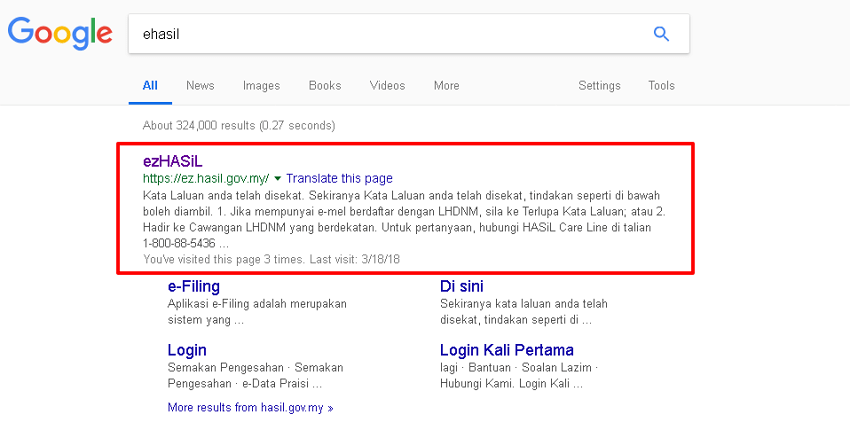
LEMBAGA HASIL DALAM NEGERI. E-FILING
Note: Depending on the LHDN website manager, the above url may change from time to time. So it’s better to use the google search function.
This will take you to the login view for eHASiL as follows:
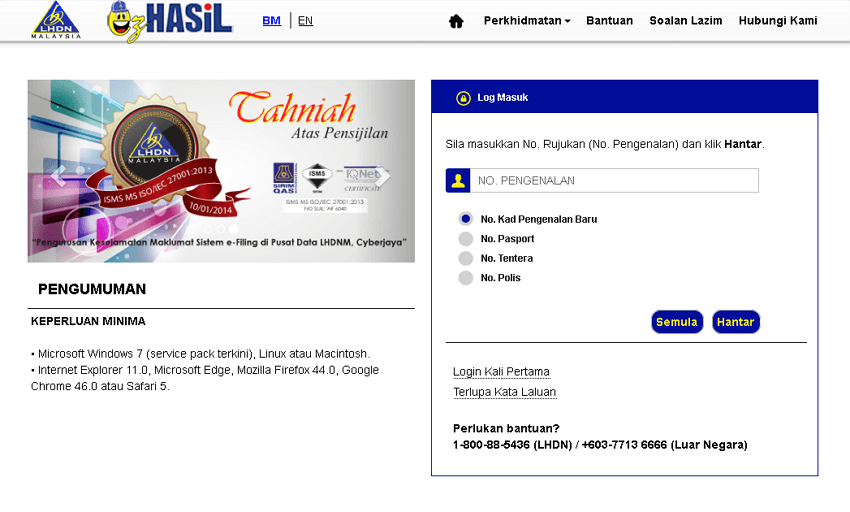
LHDN
STEP 2
LOG IN YOUR EZHASIL ACCOUNT
Additional info: Refer First Time List if this is the first time you fill in and Forgot Password if you do not remember your password.
- Enter your Identity card number (no distance / space or dash)
- Click on the Submit button.
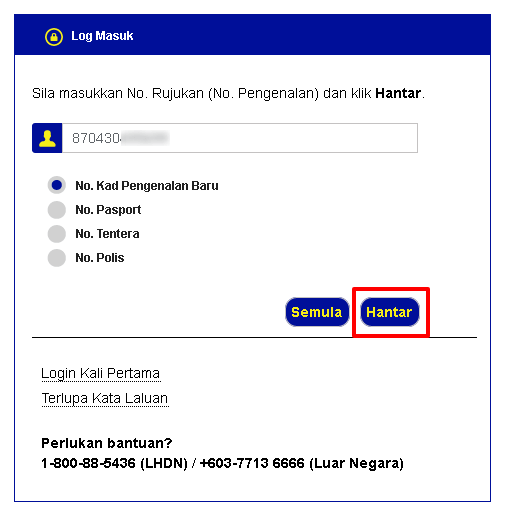
LHDN
The following display will appear.
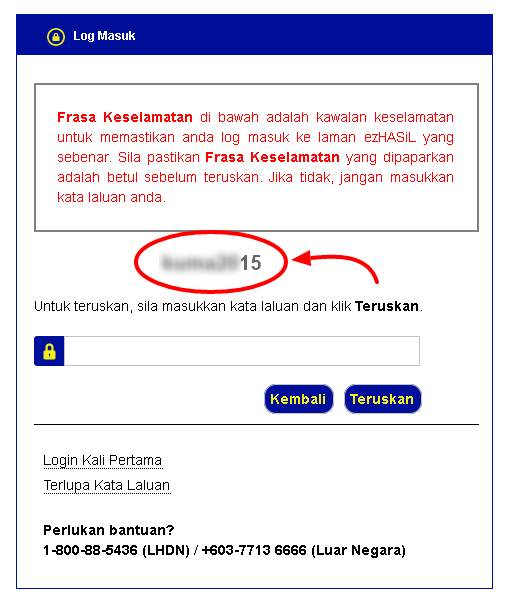
LEMBAGA HASIL DALAM NEGERI
- Before entering your password / password, make sure that the security phrase displayed is your security phrase.
- Enter your password and click the Continue button
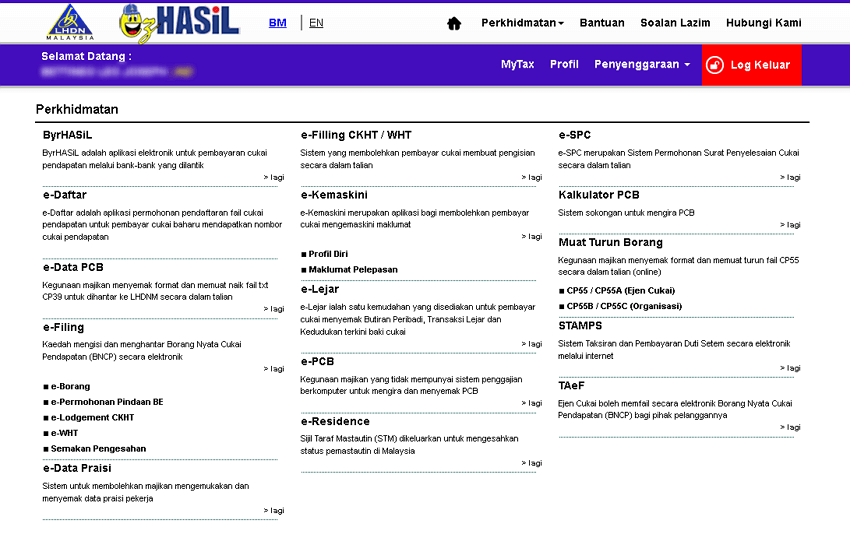
e-filing LHDN
- On the main view select the e-Form link located under the e-Filing section.
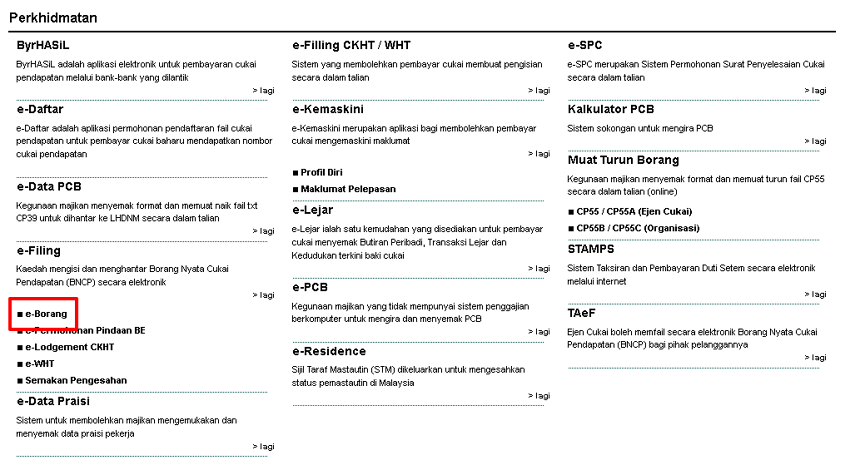
LEMBAGA HASIL DALAM NEGERI. E-FILING
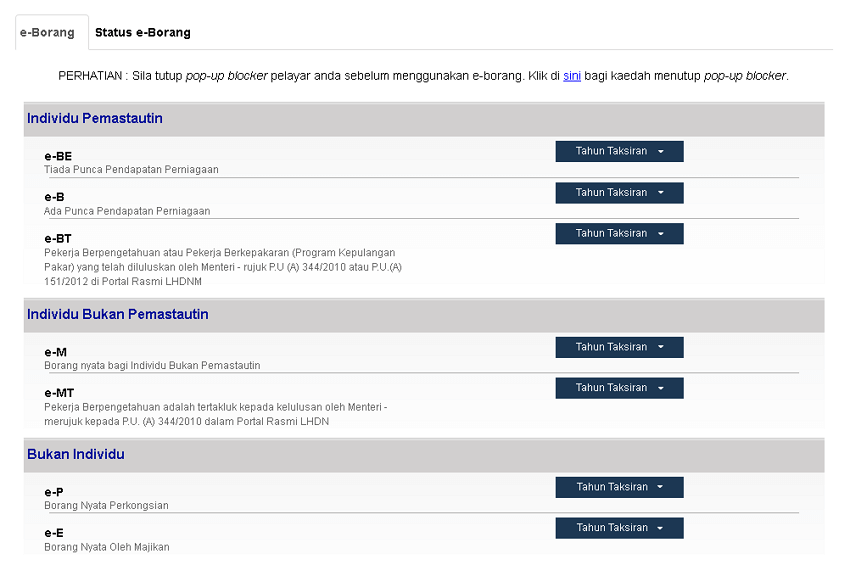
- The following display will appear
LEMBAGA HASIL DALAM NEGERI. E-FILING
- In the e-BE section, click on the Year of Assessment button and select the year you want to report.
LEMBAGA HASIL DALAM NEGERI. E-FILING
- This will take you to the next section of the section: Individual Forms
STEP 4
COMPLETE INDIVIDUAL INFORMATION
The following is an example of an Individual Information section view:
LEMBAGA HASIL DALAM NEGERI. E-FILING
Part of this section is already available by LHDNM itself. You only need to complete or modify the data according to the actual data you have.
Just fill in the requested information such as – Name, date of birth, gender and so on.
There are some parts that are quite confusing, less clear and hard to understand.
The sections I list are as follows:
- Eligible for incentives under section 127: For example, the Ministry has received written approval for tax exemption. Often we will choose NOT APPLICABLE. If it is applicable to you, please refer to the following Act: Income Tax Act on page 346.
- Dispose of assets under the Real Property Gains Tax Act 1976: This applies to the sale of assets such as houses and land. If you sell any assets it is about you. For guidance here.
- Reporting the disposal to LHDNM: Fill in this section if you answered yes to the section above. Also ignore it.
IKLAN TEXT -HITAM
After completion proceed to the INCOME section.
STEP 5
COMPLETE THE INFORMATION ABOUT YOUR INCOME
Click on the Income section located at the end of the Individual Info.
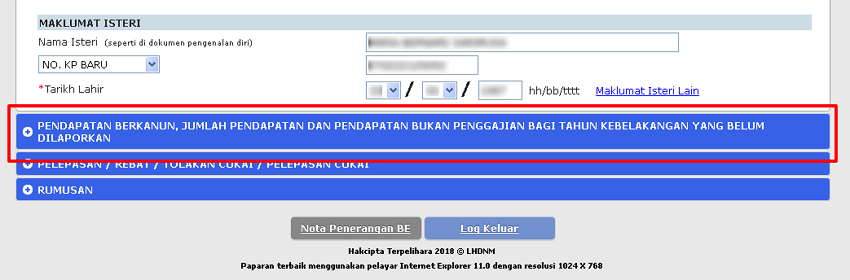
LEMBAGA HASIL DALAM NEGERI. E-FILING
This will take you to the following views:
LEMBAGA HASIL DALAM NEGERI. E-FILING
There are spaces that can be changed and can not be changed in this section.
LEMBAGA HASIL DALAM NEGERI. E-FILING
White space can be filled in @ changed.
The yellow colored space is automatic @ can not be changed.
Note: Just ignore the number after the decimal point. No cents need to be filled in. Examples: RM30,000.50 in content as RM30,000 only.
White space can be filled in @ changed.
The yellow colored space is automatic @ can not be changed.
Note: Just ignore the number after the decimal point. No cents need to be filled in. Examples: RM30,000.50 in content as RM30,000 only.
You need your EA form to fill out this section. Let’s see one way to fill this part
Statutory income from employment
Information for this section is available from Part B in your EA form.
Here is Section B in the EA form example:
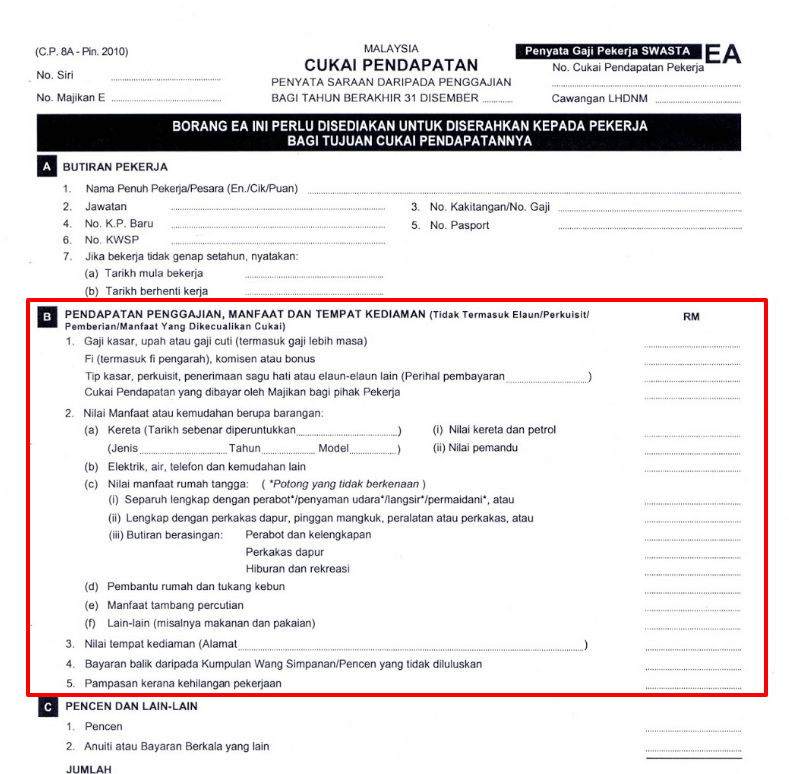
LEMBAGA HASIL DALAM NEGERI. E-FILING
Sum it up. The final amount is included in the column Statutory income of employment.
Revenue statutory income
Fill in this section if you have income from activity @ rent rental business as follows:
- Residential rental
- Rent a shophouse
- Rent land
- Hire a plant
- Rent a machine
- Furniture
Enter the final amount for all rental income for the year under review.
Statutory income of benefits, discounts, royalties …
For the statutory income of interest, discounts, royalties, premiums, pensions, annuities, other periodic payments and any other revenue or profits of the description are as follows:
- Interest: Interest (interest) of saved money @ invested in any institution. Except for the institutions listed here.
- Discounts: Income from discounting transactions involving treasury bills, exchange bills or promissory notes.
- Royalties: Earnings from copyrighted use @ patents. Some amount of income from royalties is tax exempt. You can refer here.
- Premium: Premium income such as insurance.
- Pension: Taxes only apply to those who have early pensions (less than 55 years old) or earn more than 2 pension salaries.
- Annuity: Income from wills.
- Periodic payments: Other payments received repeatedly at certain times
In addition you can report side income here (Part-time work, writing, etc.).
Sum up all and enter the final amount in the space provided.
LESS: Donations / gifts / donations approved
Fill this part if you ever donate or make good. However it must be approved by the relevant parties.
Among the types of donations, gifts and donations are:
- Gift of money to Government / State Government / local authority
- Gift money to approved institution / organization / fund
- Gift money for sports activities
- Gift money or cost contribution for a stakeholder project
- Gift of artifacts, manuscripts or paintings
- Librarian gift library or library
- Contributions to public utilities and to persons with disabilities
- Contribution for medical costs to any health agency
- Painting to the art hall
Sum up everything and fill in the space provided.
PCB Monthly Tax Deductions Installment .
This section records the installment of monthly tax deduction paid to LHDN – The deduction made from your monthly salary.
For this space, LHDN is ready to fill the amount of tax they receive. Make sure the amount is equal to what is in your EA form.
If there is a difference get certainty from your employer. Your primary reference is the amount of tax deductions posted in your EA form.
Non-paid income for the last year that has not been reported
If there is any income (non-salary) for previous years (other than the reported year) that have not been reported may be placed in this section.
After completing the entire section in this section go to the next section of the release section.
STEP 6 COMPLETE INFORMATION FOR RELIEF
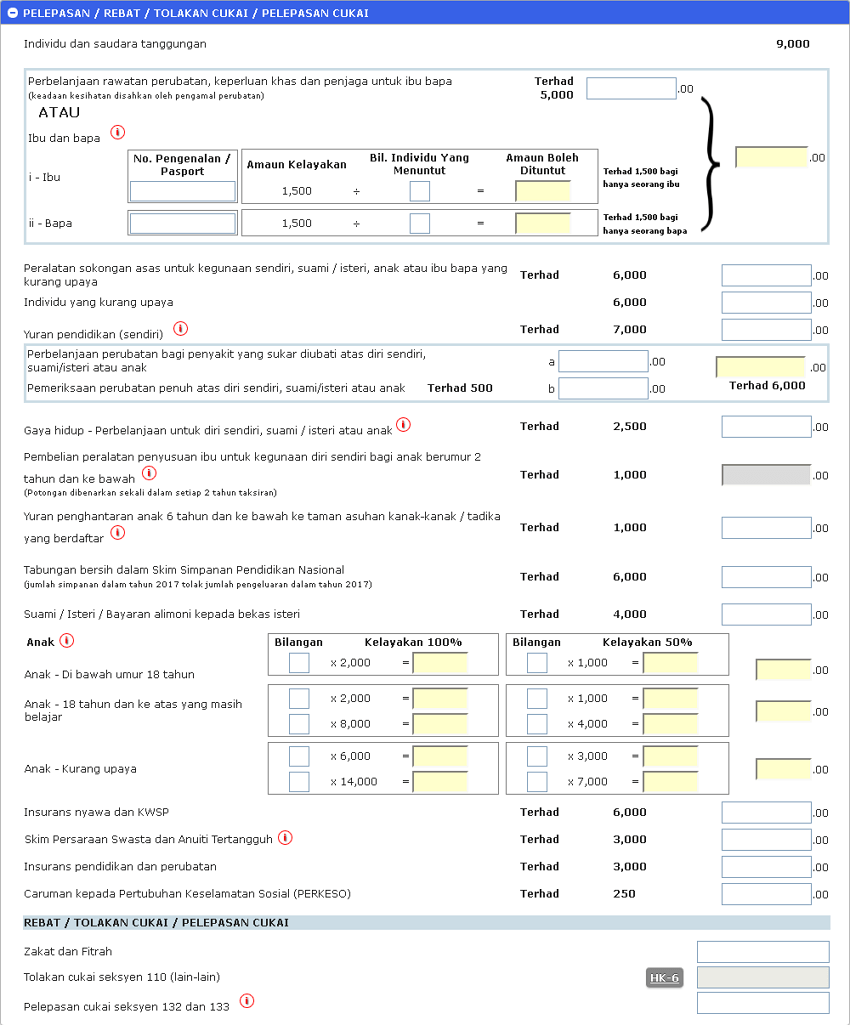
LEMBAGA HASIL DALAM NEGERI. E-FILING
These include rebates, tax deductions and tax relief.
This part is quite a bit longer. It is best if you first prepare all the things to ask before the actual e-Filing form.
Let’s start.
1. Medical care expenses, special needs and guardians for parents
The deduction limit for this part is RM5,000 and parents must live in Malaysia.
Claims must be supported by medical practitioners registered with the Malaysian Medical Council. There is a written record of a medical practitioner (doctor) stating that a parent needs medical treatment.
In the event of taking care of the guardian, it must have written evidence of the guardian (husband / wife, child or self not counted as guardian)
Among the qualifying medical expenses in this category are:
Medical treatment and care
Dental treatment (remove, paste, cleansing of teeth)
Note: Cosmetic treatments are not included in this section.
2. Mother and Father
Individuals eligible to claim relief in this section must:
Legitimate child or adopted child.
You are not claiming for treatment expenses, special needs for parents
Parents 60 years and above, earning not more than RM24,000 per year and living in Malaysia.
The discharge limit for this section is RM1,500 for mothers and RM1,500 for fathers.
If all siblings pay for discharge, the discharge limit must be divided equally with the total number of claimants.
3. Basic support equipment for your own use, spouse, child or disabled parent.
Purchase of support tools such as hemodialysis machines, wheelchairs, fake legs and hearing aids for yourself, legitimate spouses, children and parents.
The allowable deduction limit is RM6,000.
4. Individuals with disabilities
Additional discharge is given to individuals with disabilities with a limit of RM6,000.
5. Self-education fee
If you are pursuing education that aims to improve your skills or qualifications you are eligible to claim a release up to RM7,000.
The institution or professional body must be recognized by the Malaysian government.
Education example:
Master’s degree or doctoral degree.
Higher education than masters and doctors – legal, accounting, financial, technical, vocational, industrial, technological …
6. Medical expenses for difficult illness for self, spouse and child.
This refers to diseases such as:
- AIDS
- Parkinson
- Cancer
- Kidney disease
- Leukemia
- Heart attack
- Pulmonary hyper tension
- Chronic liver disease
- Hepatitis
- Head trauma
- Neurological deficits
- brain tumor
- Blood vessel defects
- Blister @ burns outrageous
- Organ transplantation
- Hand / foot cuts
The release limit is RM6,000 (this includes RM500 medical expenses in the next section).
7. Full medical examination of yourself, spouse and child
Any medical check up for yourself, legal couples as well as children with a limit of RM500.
8. Lifestyle - expenses for yourself, spouse or child
Relocation for lifestyle categories with a limit of RM2,500 for themselves, legitimate couples and children.
This category includes:
- Purchase of books, magazines, printed newspapers and other similar publications – In the form of hardcopy or softcopy and excluding illegal reading (adult readings and so on).
- Purchase of computers, laptops, smartphones or tablets – not for business purposes.
- Purchase of sporting equipment for sports activities and gym fees – full list can refer here (list can and can not).
- Internet monthly bill payment – Billing must be registered in its own name.
Additional references: The Sports Development Act
9. Purchase of maternity breastfeeding equipment for children aged 2 years and below.
This tax relief is for women who have less than 2 years of age, living in Malaysia with a discharge of RM1,000.
This release is only eligible for private assessment (female) or joint assessment in the name of the wife only. If you make a joint assessment on behalf of a husband, you are not eligible to apply for this release.
Women can take this release once every 2 years.
Among the equipment included in this category are:
- Milk pump kit and ice pack
- Collection and storage of breast milk
- Set or cooling bag
IKLAN TEXT -HITAM
10. Subscription fees 6 years old to the registered nursery / kindergarten
A release of RM1,000 for children aged 6 years and below who is sent to a registered nursery or kindergarten.
The release limit is only RM1,000 although the child who fulfills this section is more than one.
Who can claim this release?
All types of assessment provided no more than RM1,000. If you choose a separate estimate, a claim can be made on the same child provided that each claim does not exceed RM1,000.
Note: Claims for this section may also be made by individuals who have been divorced on the same child.
11. Net savings in the National Education Savings Scheme
If you have deposited into the SSPN tube you can apply for a release in this section with a limit of RM6,000.
The deductions claimed are only valid for net savings in the year under review after deducting the same year’s expenditure.
For example:
The initial balance of savings in 2017 is = RM10,000
Total savings in 2017 = RM5,000
Total production in 2017 = RM500
The amount of claims that can be claimed is: Savings – withdrawals in 2017 = RM5,000 – RM500 = RM4,500.
12. Husband / wife / alimony payment to former wife
The discharge of this part may be delayed if your spouse (legal spouse) has no source of income.
Husband can also claim this release if for ex-wife provided with proof of official payment arrangement.
The release limit for this section is RM4,000.
13. Children
In the Child section there are 3 sections: Children under 18, Children over 18 years old and still studying and disabled children.
For each section you can apply for a release of either 100% qualification or 50% qualification only.
For 100% qualification, the claimant must be a legitimate spouse. If you choose a separate estimate, the same child can be claimed once.
Example: Mat has 3 children. Mat demands release for 2 people while his wife demands release for only one person.
For 50% of eligible, 2 or more individuals may claim the same right. Individuals who claim to live separately (or have been divorced).
For children under 18 years of age (and unmarried) the release limit is RM2,000 per person.
For children above 18 years of age, unmarried and following any full-time education courses the release limit is RM2,000 per person.
If your child is 18 years old and above, have not married and are following a course such as:
Diploma, degree and above studies at institutions within Malaysia (excluding pre-U or matriculation programs)
Degree of study and above for Malaysian institutions
Or any institution of higher learning recognized by the authorities / government
You are eligible to apply for a release of RM8,000 per person.
For children with disabilities, you are eligible to apply for a release with a limit of RM6,000 on the condition that the child is unmarried.
If the disabled child is pursuing higher education as stated above, aged 18 years old and unmarried, the release limit is RM14,000 per person.
14. Life insurance and EPF
The release limit for this part is RM6,000.
This includes the sum of both: Life insurance + epf pieces (EPF).
For life insurance only payment for husband and wife only can be claimed. Life insurance for children is not permitted for release of this part.
Note: For information on EPF (EPF) contributions you can refer to section E in your EA form.
15. Private Pension Scheme and Deferred Annuity
The release limit for this part is RM3,000.
If you have a Private Security Scheme approved by the Securities Commission and also a deferred premium payment premium, you are eligible to apply for a release in this section.
16. Education and medical insurance
The release limit for this part is RM3,000.
Disbursements include insurance paid for educational or medical policies for self-employment, spouses and children.
16. Contribution to the Social Security Organization (SOCSO)
The release limit for this section is RM250.
Note: For information regarding SOCSO contributions you can refer to section E in your EA form.
18. Rebate / Tax Dump / Tax Relief
- Zakat and Fitrah – Refers to the payments you have made
- Tax relief section 110 (other) – Tax exempt income such as Unit Trust. Please refer to section 110 (page 320) on this document (tax act). Require you fill out the manual HK6 form.
- Tax relief of sections 132 and 133 – Section 132 refers to income from Malaysia which is taxable in Malaysia as well as outside Malaysia. Section 133 refers to a single tax deduction only. Please refer to the following section on page 350 in this document (tax act).
After completing the completion of all these sections go to the next section by pressing the “Summary” button located at the carry part once.
STEP 7
VIEW THE SUMMARY
This column summarizes the taxation and also the waivers imposed on you.
LEMBAGA HASIL DALAM NEGERI. E-FILING
Look at the bottom to see whether you should pay or you will be paid a surplus tax.
If there is a written amount in the “FULL YEAR RETURNS 201X” column means you will receive the money again (will be in the bank in the account you are registering).
LEMBAGA HASIL DALAM NEGERI. E-FILING
Click on the continue button to go to the next section.
STEP 8
SIGNATURE AND SET OF ASSESSMENT
The following displays will appear:
LEMBAGA HASIL DALAM NEGERI. E-FILING
In summary this section is a declaration that you have filled out the assessment honestly and if you are not honest you are prepared to receive any penalty.
To confirm and send the estimation you need to click the Signature & Send button located at the bottom of the declaration.
LEMBAGA HASIL DALAM NEGERI. E-FILING
A notification display will appear (if there is a surplus tax payment), press OK to continue.
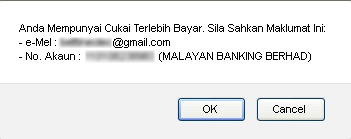
LEMBAGA HASIL DALAM NEGERI. E-FILING
Enter your identity card (no distance or dash) and your password as proof of ‘signature’.
This will take you to the acceptance confirmation section as follows:
LEMBAGA HASIL DALAM NEGERI. E-FILING
This confirms that your tax assessment form has been successfully submitted and accepted by IRBM.
Click on the “Exit Exit” button at the bottom to exit.
The last view is as follows:
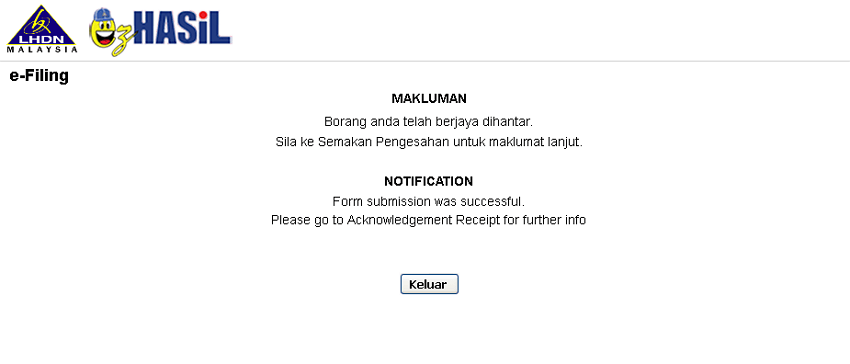
LEMBAGA HASIL DALAM NEGERI. E-FILING
With the appearance of the above display means completing your tax assessment form is complete.
GOOD LUCK
Cpo trading scam
Ebay
Globalforex4u.com
IKLAN TEXT -HITAM
TAGS
lhdn e filing
e filing 2018
tarikh akhir e filing 2017
e filling login
cukai pendapatan individu
borang e 2017
ea form
IKLAN TEXT -HITAM
Hotel Murah 2u
Memuatkan …
PINJAMAN PERIBADI TERBAIK
Memuatkan …